Know if the load pays before you say yes.
Type in what the broker is offering, or let your dispatcher send it over. It prices the run against what your truck actually costs, and gives you a straight answer: take it, push for more, or walk away. Book it, and the paperwork fills itself in from the rate con.
You and your dispatcher
Nothing gets booked until you have seen the number.
Your dispatcher finds the load and sends it over. It lands in your app already priced: what is actually left after fuel, deadhead, the truck and their cut. One tap approves it. Their pay is worked out at their own rate, on the loads they booked, and goes straight into the books.
Every screenshot on this page is the real app, running a demo carrier we keep for the purpose: Blue Ridge Hauling, its owner Alex, and its dispatcher Jordan. Nothing here is a drawing.
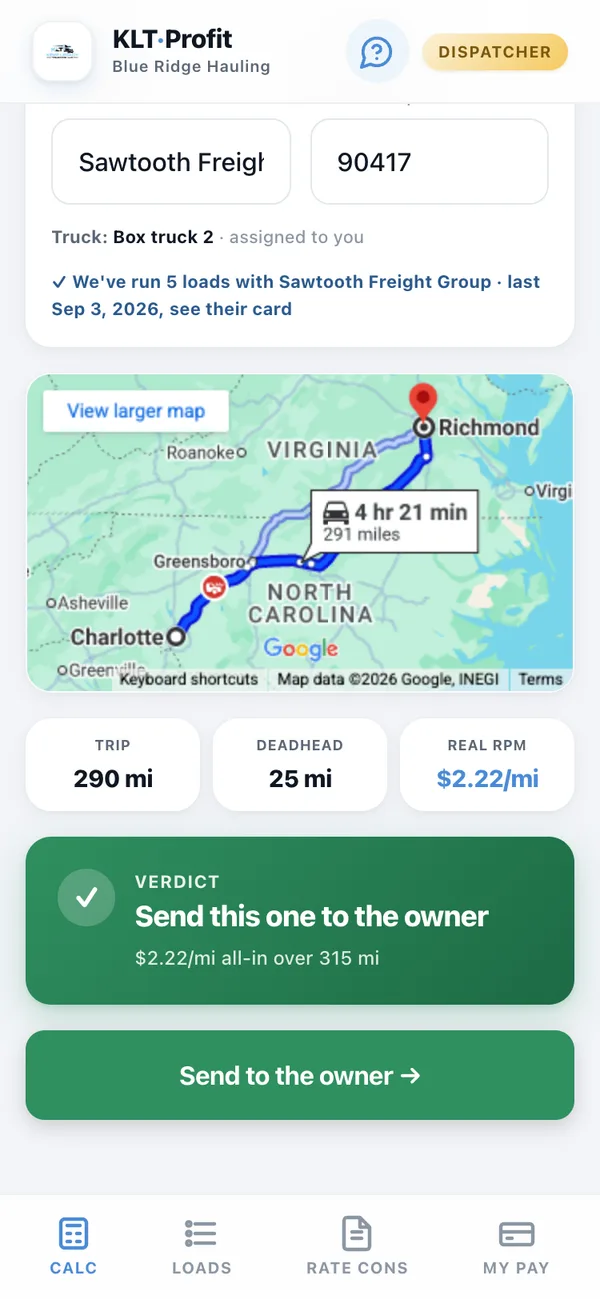
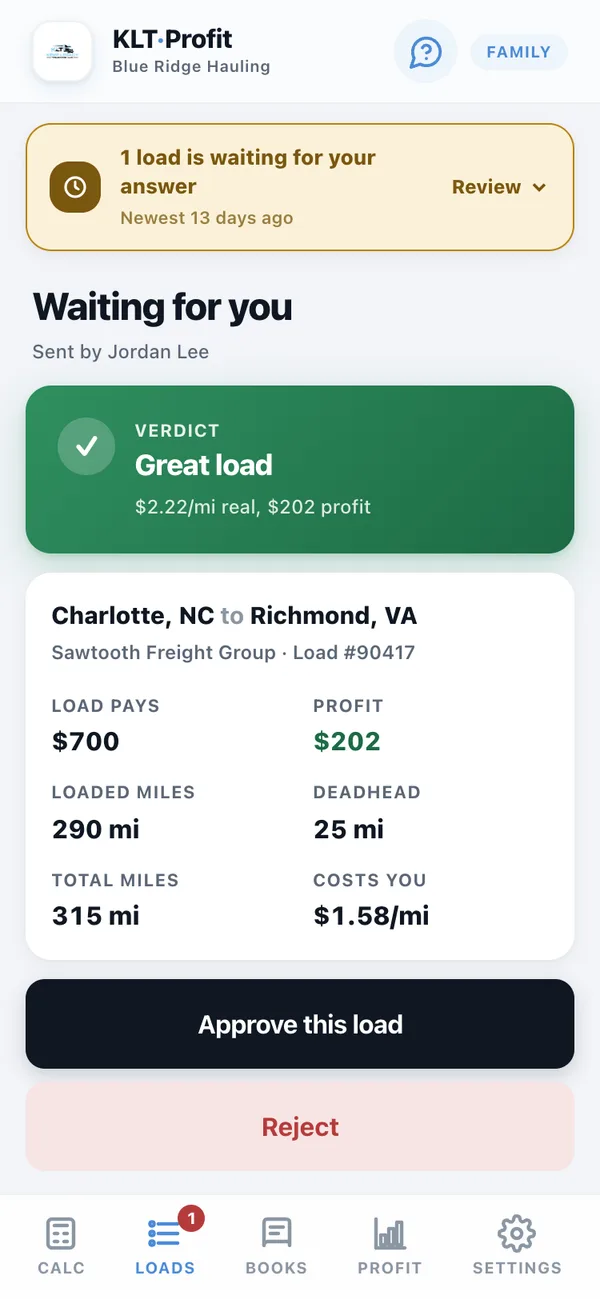
- The dollars stay on your screen. Your dispatcher sees the verdict and the rate per mile, never your cost or your margin.
- One tap says yes. The load waits on your phone with the whole answer on one screen. Approve it, or turn it down and say why.
- Their cut lands in the books. At their own percentage, on the loads they booked, ready for payday.
Once you have booked it
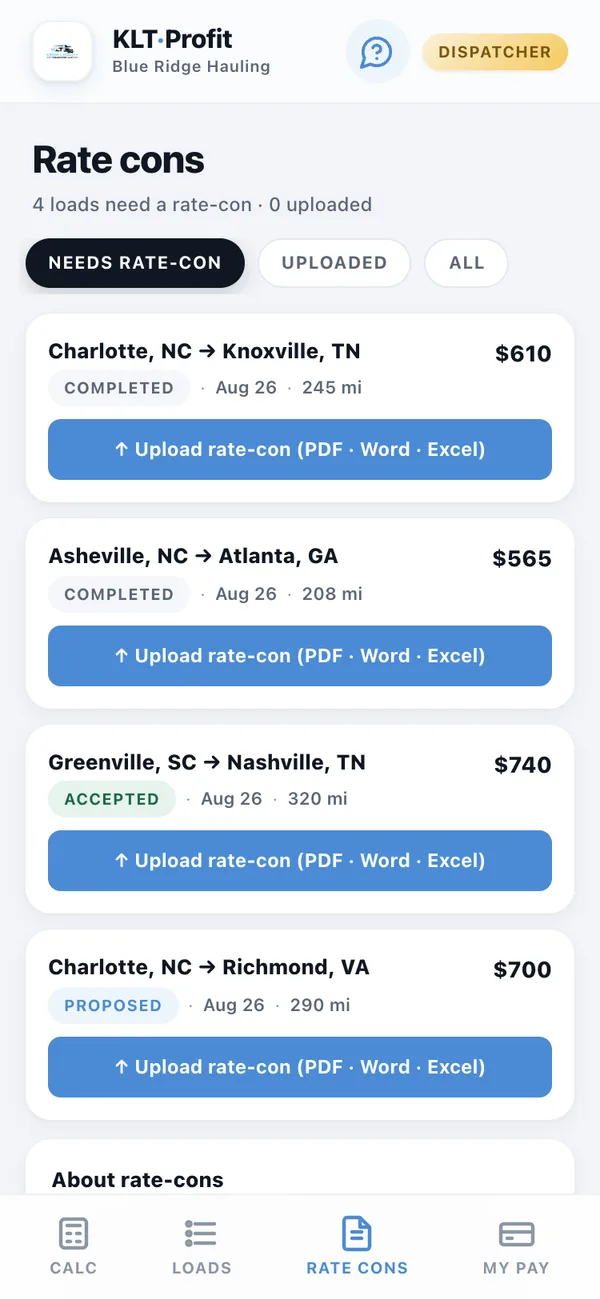
Send it the rate con. The paperwork fills itself in.
The confirmation the broker sends after you agree. Upload the PDF, or the Word or Excel version of it, and it pulls the load number, the broker, their MC number and the person on the load, files the document against the load, and adds the broker to your book. Nothing gets typed twice, and nobody texts you for the paperwork.
- Your dispatcher can file it. They attach it to the load from their side, and the office opens it from theirs.
- Brokers build themselves. Every rate con you read adds the company, their MC number and the person on the load to your own broker book.
- Filed against the load, for good. Open it from the load whenever a broker asks what was agreed.
A couple of weeks in
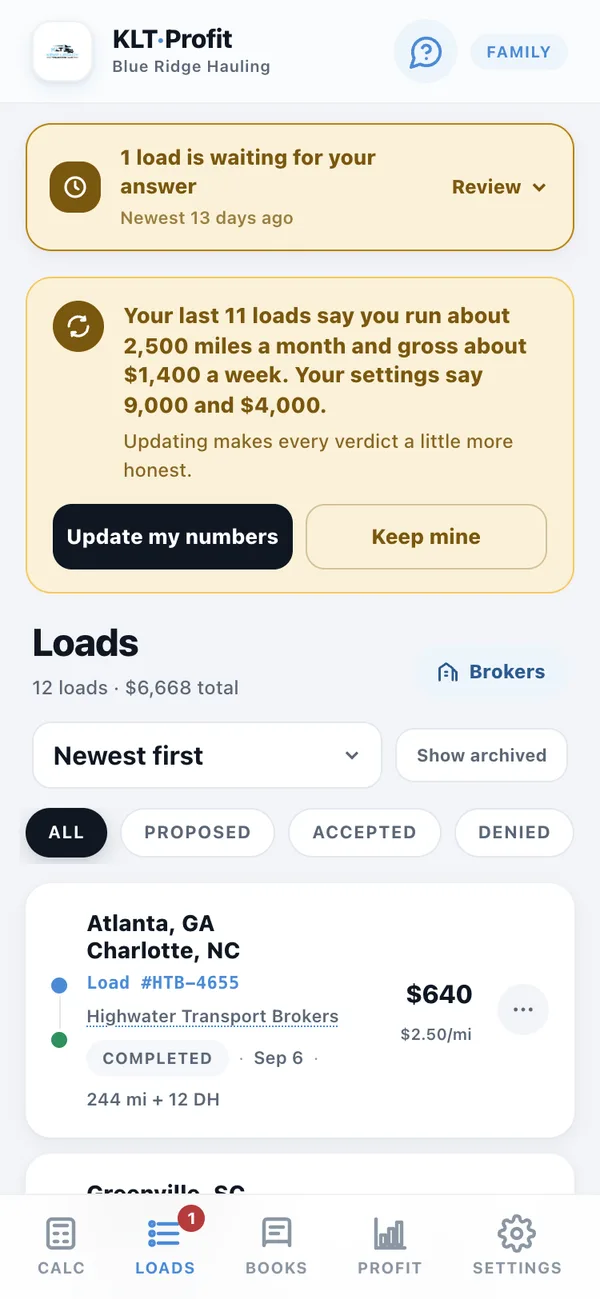
It checks your numbers against your real loads, and offers to fix them.
Cost per mile is only as honest as the miles and the money behind it, and when you set the app up, some of that was a best guess. After a couple of weeks it has your real loads. It compares what they say to what you told it, and when the two have drifted apart, it says so and offers to update your numbers. One tap, or keep yours. It never changes anything on its own.
- Every verdict gets more honest. Fix the miles once and every load you price after that is priced against the truck you actually run.
- It asks. You decide. Update my numbers, or Keep mine, and that is the end of it.
- Your numbers, not an average. Not last year's figures, and not somebody else's truck.
The same load, three different rates
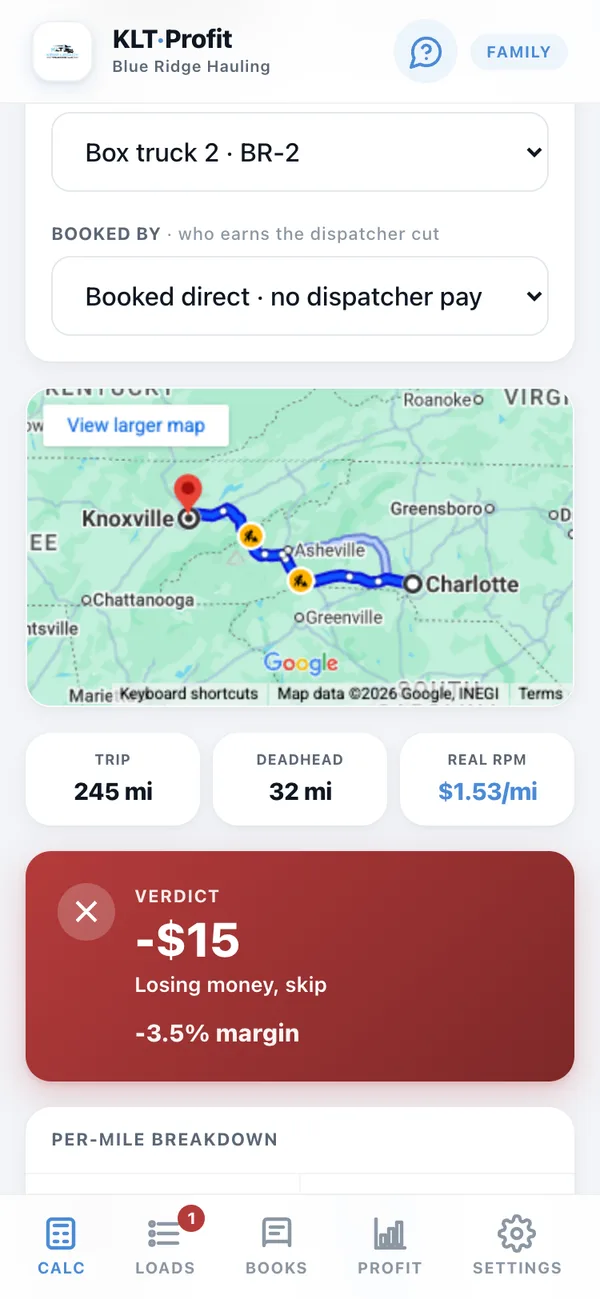
Charlotte to Knoxville. 245 miles, 32 of deadhead.
One run, typed into the calculator at three prices, straight off the app. Same miles, same truck, same deadhead. Watch the answer move.
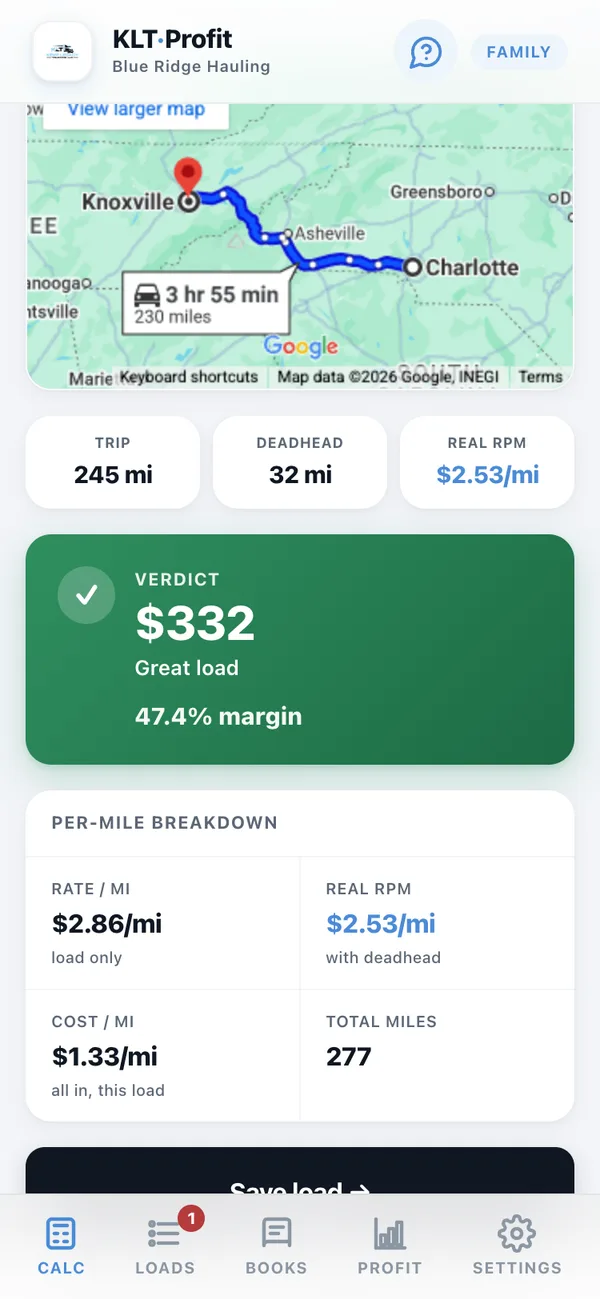
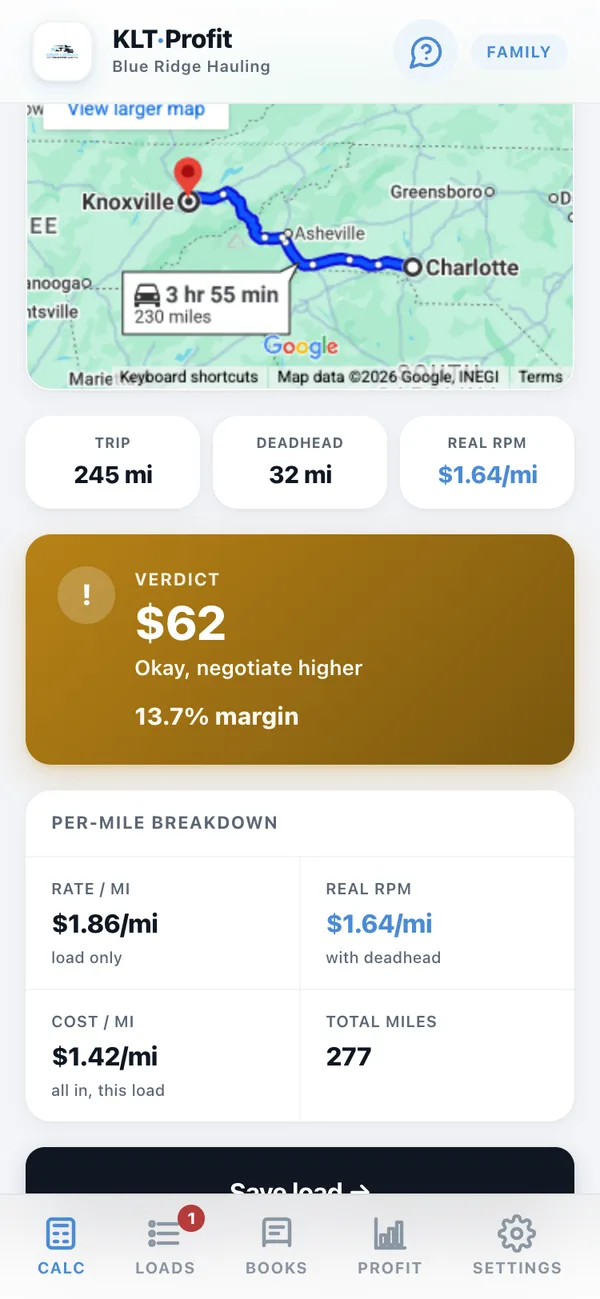
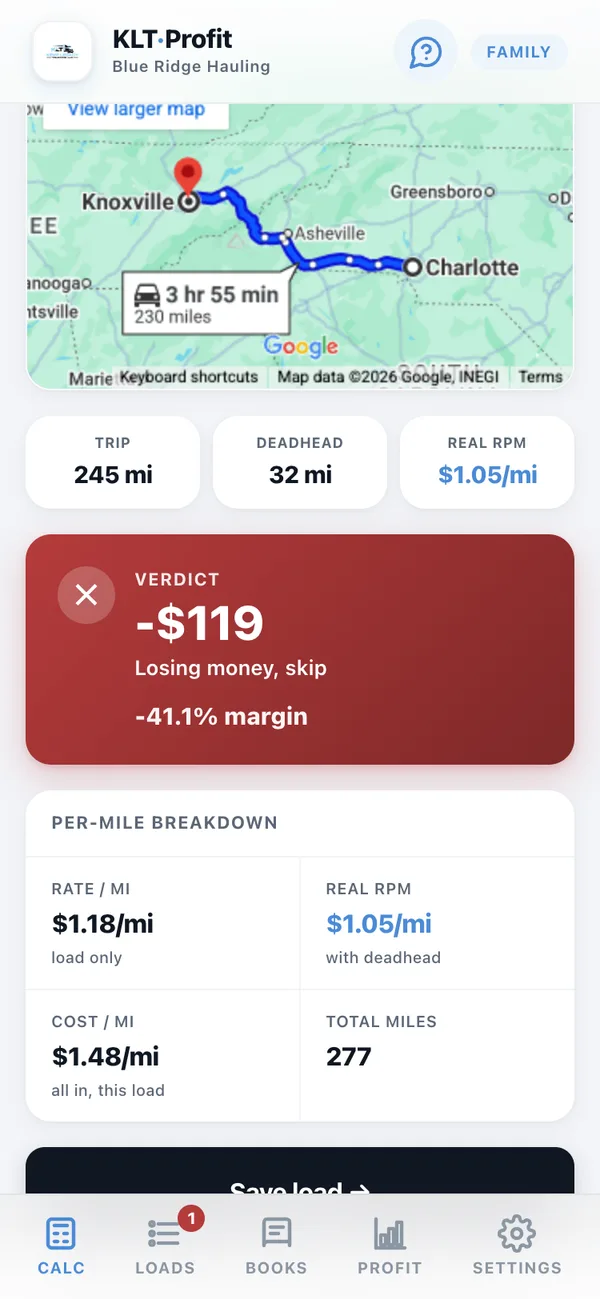
Every one of those screens shows you the map, the deadhead, and the per-mile breakdown underneath, so you can see exactly where the number came from.
Where the number comes from
What comes out of the rate before any of it is profit.
Deadhead
The miles to get to the pickup are miles you paid for. They are looked up from where your truck is sitting and added before the rate is worked out, so $3.20 a mile quietly becomes $2.55.
Fuel at your MPG
Not a national average. Your truck's real mileage and the diesel price you actually paid this week.
What the truck costs standing still
Insurance, the note, tags, maintenance. Spread across the miles you run so every load carries its share.
The dispatcher's cut
Taken off the top before you see the profit, at whatever percentage each of your bookers is on.
And the rest of what it costs to be in business: load boards, factoring, a driver's pay if you pay one, and the money you set aside for taxes. All of it is in your cost per mile, so a verdict is never a fuel-and-miles guess.
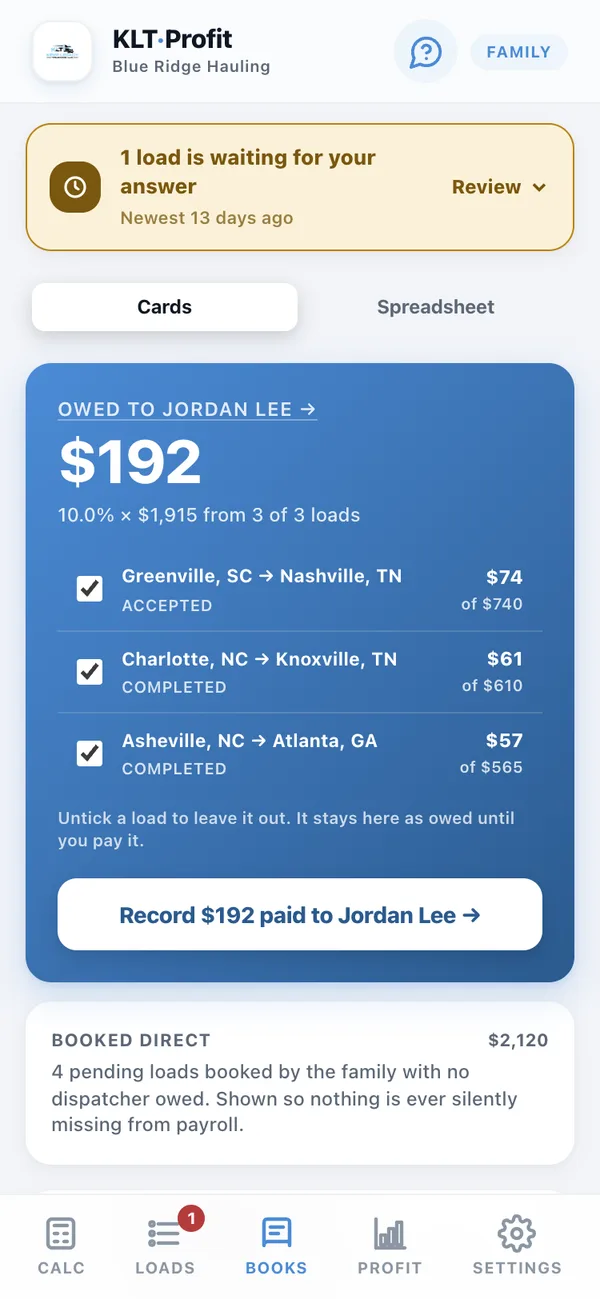
Payday
The books keep themselves.
Every load you take feeds the week's numbers. What each dispatcher is owed, at their own percentage, on the loads they actually booked. Tick the ones you are paying and it records the payout.
- Different rates per person. One booker on 8%, another on 12%, no spreadsheet.
- Detention gets added after. Base pay stays what it was, so your history never quietly rewrites itself.
- Everything downloads. Loads and pay history as spreadsheets, any time, for your accountant.
Your broker book, written for you
Every rate con you read builds your rolodex.
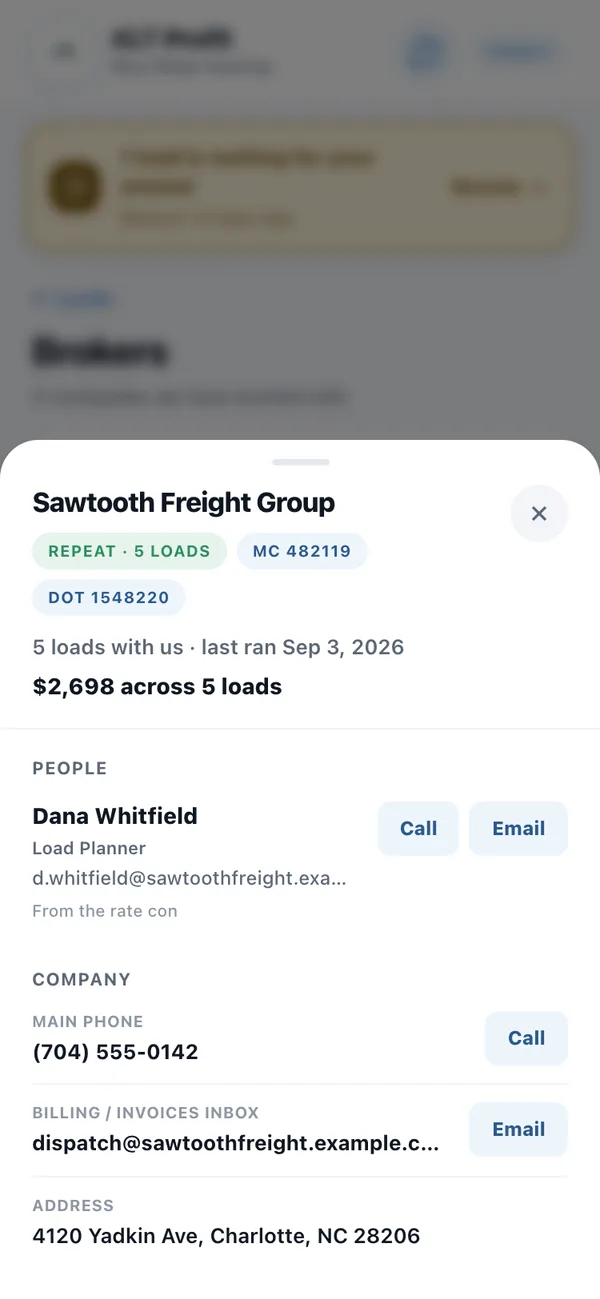
You never type a broker in. The app pulls the company off the paperwork, keeps their MC number, the phone that gets answered, and the person whose name is on the load. Then it quietly adds up what each one has actually paid you.
- Who actually pays. $2,698 across 5 loads tells you more about a broker than any load board rating.
- One tap to call. The number and the name are already there when you need to chase a check.
- Repeat brokers rise to the top. The people you run for most are the first thing you see.
The whole picture
What the business made. Not what it grossed.
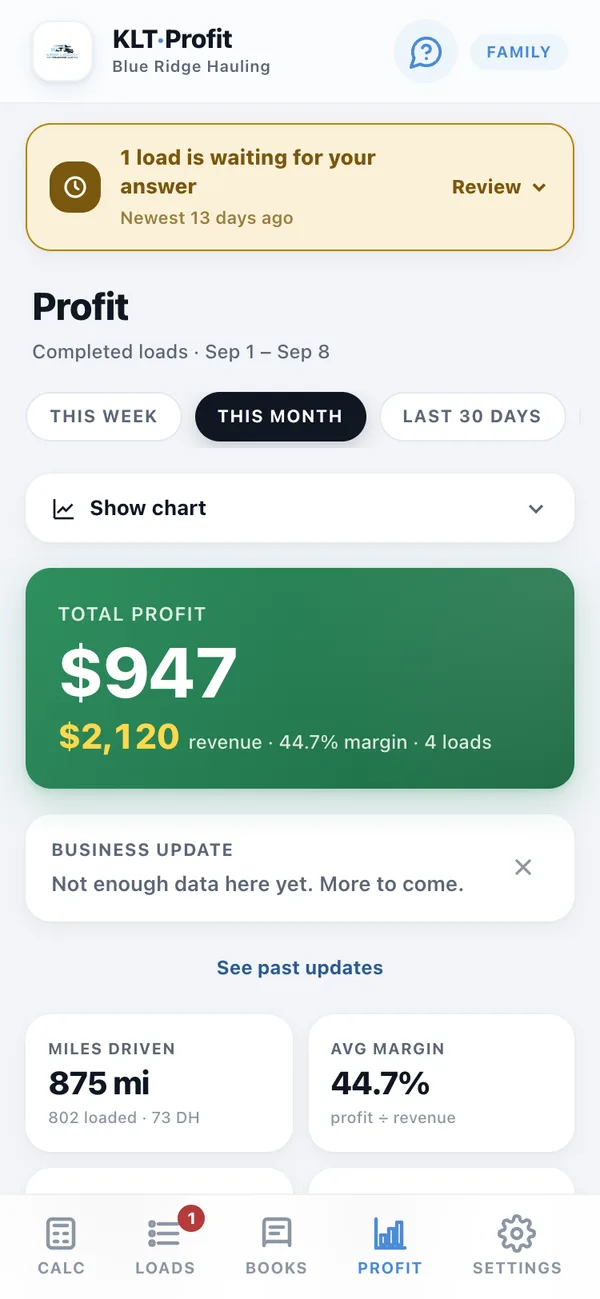
Gross is the number brokers talk about. This is the other one: revenue in, everything the truck cost, and what is genuinely left. By week, by month, by any thirty days you pick.
- Margin, not just money. A $2,000 week at 12% is a worse week than a $1,400 one at 40%, and this is where you see that.
- Loaded miles against deadhead. The empty ones are the ones quietly eating the year.
- A written read on your week. Plain English, out of your own loads, every Monday.
Set up once
It starts with numbers that fit your truck. You correct the ones you know.
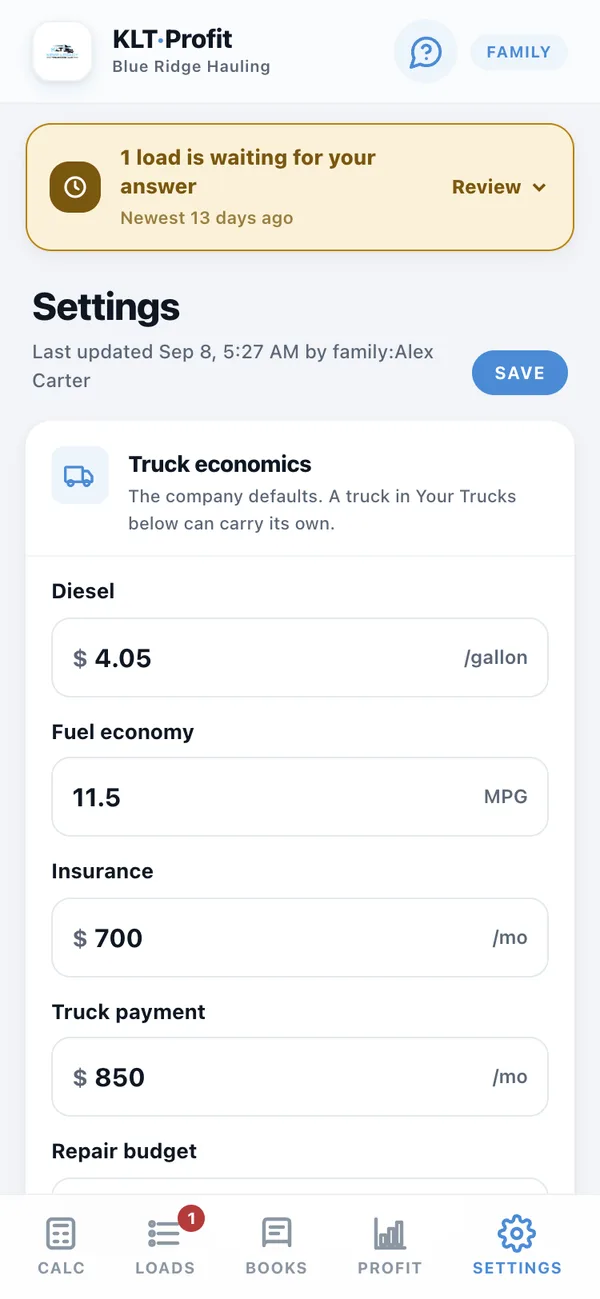
Setup asks what you run and starts every answer from a figure that already fits it: diesel, what the truck gets to the gallon, insurance, the note, repairs, load boards, the dispatcher's cut, the tax money you set aside. Change what you know, keep what you don't, and every load afterwards is priced against your truck instead of somebody's average.
- Change it whenever. Diesel jumps forty cents, you change one number and every verdict updates.
- Your dispatcher's cut too. Each booker on their own percentage, not one blanket rate.
- Nothing else to configure. No setup call, no onboarding fee, no consultant.
Who runs it
Built for one truck. Holds up at ten.
Answer a few questions about what you run, and it starts with numbers that already fit it.
More than one truck
Every truck keeps its own numbers. The verdict prices the truck that would run it.
An F350 and a box truck do not cost the same per mile, so the app stops pretending they do. Add a truck for $5.49 a month and it gets its own diesel, MPG, insurance, payment and repair budget. Anything you leave blank uses your company defaults.
- Same load, different truck, different answer. Pick the truck on the calculator and the whole verdict moves with it.
- Assign a dispatcher to a truck. Their loads, verdicts and deadhead follow that truck until you change it. Dispatchers stay free at every size.
- Each truck has its own location pin, so deadhead is figured from where that truck actually sits, not where the other one does.
One price. All of it.
Every feature, every dispatcher, on every plan. The only thing that moves the price is how many trucks you run.
That is the verdict on every load, your dispatcher's loads waiting for your yes, the rate con reader, the reality check, the books, the broker book and the profit picture. Three loads like the red one above cost more than a year of this.
30 days to change your mind, money back.
One truck is $24.99 a month or $275 a year. Every truck after that adds $5.49 a month, or $60 a year. Dispatchers are free at every size.
Changed your mind? 30 days, money back.
Ask inside 30 days and you get the subscription back. The one thing we keep is what your account actually spent having rate cons read and miles looked up, because that money is already gone to Google and Anthropic. For a normal month that is a couple of dollars, and you will see the exact figure before anything is refunded.
Said plainly
What happens when the 14 days are up.
Nothing gets deleted, and nothing gets held over your head. You just stop being able to use the part you would be paying for.
You keep
- Every load you entered, and what each one made
- Your books and your pay history
- Your broker list
- Spreadsheet downloads of all of it, any time
What stops
- Adding new loads
- Working out whether the next load pays
- Reading rate cons
- Adding dispatchers
Cancelling is a button, not an email. And if you cancel a yearly plan inside the first 30 days, you get the money back less what your account actually spent on reading paperwork.
Find out what your last load actually paid.
Sign up, answer a few questions about your truck, and put in the last load you ran. Two minutes to a real number.